[Firefox Awesome] Tối ưu Firefox
Có 02 cách chính để thay đổi các tham số của Firefox:
- Vào
about:config, tìm và sửa tham số theo nhu cầu- Sửa file
user.js(khuyến khích để có thể theo dõi thay đổi và backup):
- Mở
about:support=> Open Profile Folder- Đóng Firefox (tắt hẳn - chú ý với MacOS: Close khác với Quit)
- Tạo mới nếu chưa có
- Thêm dòng mới
user_pref("<tham số>", <giá trị mới>);- Save và mở Firefox
user.jslà file javascript nên có thể sử dụng//và/**/để viết ghi chú
Tổng hợp user.js, cách sử dụng:1
- Mở thư mục
profile - Tải link dưới vào thẳng thư mục
profile- hoặc Tạo fie
user.jsrồi paste hết đoạn javascript này vào đấy, lưu lại - hoặc Tạo fie
Download: https://github.com/codeotamlong/awesome/blob/main/firefox/user.js
1
2
3
4
5
6
7
8
9
10
11
12
13
14
15
16
17
18
19
20
21
22
23
24
25
26
27
28
29
30
31
32
33
34
35
36
37
38
39
40
41
42
43
44
45
46
47
48
49
50
51
52
53
54
55
56
57
58
59
60
61
62
63
64
65
66
67
68
69
70
71
72
73
74
75
76
77
78
79
80
81
82
83
84
85
86
87
88
89
90
91
92
93
94
95
96
97
98
99
100
101
102
103
104
105
106
107
108
109
110
111
112
113
114
115
116
117
118
119
120
121
122
123
124
125
126
127
128
129
130
131
132
133
134
135
136
137
138
139
140
141
142
143
144
145
146
147
148
149
150
151
152
153
154
155
156
157
158
159
160
161
162
163
164
165
166
167
168
169
170
171
172
173
174
175
176
177
178
179
180
181
182
183
184
185
186
187
188
189
190
191
192
193
194
195
196
197
198
199
200
201
202
203
204
205
206
207
208
209
210
211
212
213
214
215
216
217
218
219
220
221
222
223
224
225
226
227
228
229
/*
** PERSONALIZE
*/

// Un-check singature extension
user_pref("xpinstall.signatures.required", false);
user_pref("xpinstall.whitelist.required", false);

// No exception on extension
user_pref("extensions.webextensions.restrictedDomains", "");

// Enable userChrome.css
user_pref("toolkit.legacyUserProfileCustomizations.stylesheets", true);

// UserChrome FindBar Floating Top - Right
user_pref("userchrome.floating-findbar-on-right.enabled", true);

/*
** SPEED-UP
*/

// Delay to first render
user_pref("nglayout.initialpaint.delay", 2000);
user_pref("nglayout.initialpaint.delay_in_oopif", 2000);

// Force RAM cache
//user_pref("browser.cache.disk.enable", false);
//user_pref("browser.cache.memory.enable", true);
//user_pref("browser.cache.memory.capacity", 524288);
//user_pref("browser.cache.memory.max_entry_size", 512000);

// Force RAM cache - Disable RCWN
user_pref("network.http.rcwn.enabled", false);

// Disable SkeletonUI
user_pref("browser.startup.preXulSkeletonUI", false );

// Disable Accessibility
user_pref("accessibility.force_disabled", 1 );

/*
** UX/UI
*/

// Compact mode (slim toolbar)
user_pref("browser.compactmode.show", true );

// Enable Early hints
user_pref("network.early-hints.enabled", true);
user_pref("network.early-hints.preconnect.enabled", true);
user_pref("network.early-hints.preconnect.max_connections", 20);

// Bypass Cookie Banners:
//      1 - Decline ALL (DECLINE - if FAILED, KEEP banner);
//      2 - Hide ALL    (DECLINE - if FAILED, ACCEPT - to remove banner);
user_pref("cookiebanners.service.mode", 2 );
user_pref("cookiebanners.service.mode.privateBrowsing", 2 );

// Bypass Cookie Banners - emulator CLICK, cookie INJECTOR:
user_pref("cookiebanners.bannerClicking.enabled", true );
user_pref("cookiebanners.cookieInjector.enabled", true );

// Smooth scroll
user_pref("apz.overscroll.enabled", true);
user_pref("general.smoothScroll", true);
user_pref("mousewheel.enable_pixel_scrolling", false );
user_pref("mousewheel.default.delta_multiplier_y", 275 );
user_pref("general.smoothScroll.mouseWheel.durationMaxMS", 250 );
user_pref("general.smoothScroll.mouseWheel.durationMinMS", 200 );

/*
** NETWORK
*/

// Disable OSCP
user_pref("security.OCSP.enabled", 0);

// Enable CrLite
user_pref("security.remote_settings.crlite_filters.enabled", true);
user_pref("security.pki.crlite_mode", 2);

// Next DNS
user_pref("network.trr.uri", "https://doh3.dns.nextdns.io/");
user_pref("network.trr.custom_uri", "https://doh3.dns.nextdns.io/");
user_pref("network.trr.mode", 2);

// Enable QUICv2
user_pref("network.http.http3.alt-svc-mapping-for-testing", 'doh3.dns.nextdns.io; h3=":443"; quicv="709a50c4,1", dns.google; h3=":443"; quicv="709a50c4,1"');

/*
** PRIVACY - SECURITY
*/

// Resist Fingerprint (RFP)
user_pref("privacy.resistFingerprinting", true);

// Enable punnycode
user_pref("network.IDN_show_punycode", true);

// Enable Multi-Account Container
user_pref("privacy.userContext.enabled", true); //enable Multi-Account Container
user_pref("privacy.userContext.ui.enabled", true); //enable Multi-Account Container

/*** [SECTION 0200]: GEOLOCATION / LANGUAGE / LOCALE ***/
user_pref("_user.js.parrot", "0200 syntax error: the parrot's definitely deceased!");
/* 0201: use Mozilla geolocation service instead of Google if permission is granted [FF74+]
 * Optionally enable logging to the console (defaults to false) ***/
user_pref("geo.provider.network.url", "https://location.services.mozilla.com/v1/geolocate?key=%MOZILLA_API_KEY%");
   // user_pref("geo.provider.network.logging.enabled", true); // [HIDDEN PREF]
/* 0202: disable using the OS's geolocation service ***/
user_pref("geo.provider.ms-windows-location", false); // [WINDOWS]
user_pref("geo.provider.use_corelocation", false); // [MAC]
user_pref("geo.provider.use_gpsd", false); // [LINUX]
user_pref("geo.provider.use_geoclue", false); // [FF102+] [LINUX]

/*** [SECTION 0300]: QUIETER FOX ***/
user_pref("_user.js.parrot", "0300 syntax error: the parrot's not pinin' for the fjords!");
/** RECOMMENDATIONS ***/
/* 0320: disable recommendation pane in about:addons (uses Google Analytics) ***/
user_pref("extensions.getAddons.showPane", false); // [HIDDEN PREF]
/* 0321: disable recommendations in about:addons' Extensions and Themes panes [FF68+] ***/
user_pref("extensions.htmlaboutaddons.recommendations.enabled", false);
/* 0322: disable personalized Extension Recommendations in about:addons and AMO [FF65+]
 * [NOTE] This pref has no effect when Health Reports (0331) are disabled
 * [SETTING] Privacy & Security>Firefox Data Collection & Use>Allow Firefox to make personalized extension recommendations
 * [1] https://support.mozilla.org/kb/personalized-extension-recommendations ***/
user_pref("browser.discovery.enabled", false);

/** TELEMETRY ***/
/* 0330: disable new data submission [FF41+]
 * If disabled, no policy is shown or upload takes place, ever
 * [1] https://bugzilla.mozilla.org/1195552 ***/
user_pref("datareporting.policy.dataSubmissionEnabled", false);
/* 0331: disable Health Reports
 * [SETTING] Privacy & Security>Firefox Data Collection & Use>Allow Firefox to send technical... data ***/
user_pref("datareporting.healthreport.uploadEnabled", false);
/* 0332: disable telemetry
 * The "unified" pref affects the behavior of the "enabled" pref
 * - If "unified" is false then "enabled" controls the telemetry module
 * - If "unified" is true then "enabled" only controls whether to record extended data
 * [NOTE] "toolkit.telemetry.enabled" is now LOCKED to reflect prerelease (true) or release builds (false) [2]
 * [1] https://firefox-source-docs.mozilla.org/toolkit/components/telemetry/telemetry/internals/preferences.html
 * [2] https://medium.com/georg-fritzsche/data-preference-changes-in-firefox-58-2d5df9c428b5 ***/
user_pref("toolkit.telemetry.unified", false);
user_pref("toolkit.telemetry.enabled", false); // see [NOTE]
user_pref("toolkit.telemetry.server", "data:,");
user_pref("toolkit.telemetry.archive.enabled", false);
user_pref("toolkit.telemetry.newProfilePing.enabled", false); // [FF55+]
user_pref("toolkit.telemetry.shutdownPingSender.enabled", false); // [FF55+]
user_pref("toolkit.telemetry.updatePing.enabled", false); // [FF56+]
user_pref("toolkit.telemetry.bhrPing.enabled", false); // [FF57+] Background Hang Reporter
user_pref("toolkit.telemetry.firstShutdownPing.enabled", false); // [FF57+]
/* 0333: disable Telemetry Coverage
 * [1] https://blog.mozilla.org/data/2018/08/20/effectively-measuring-search-in-firefox/ ***/
user_pref("toolkit.telemetry.coverage.opt-out", true); // [HIDDEN PREF]
user_pref("toolkit.coverage.opt-out", true); // [FF64+] [HIDDEN PREF]
user_pref("toolkit.coverage.endpoint.base", "");
/* 0334: disable PingCentre telemetry (used in several System Add-ons) [FF57+]
 * Defense-in-depth: currently covered by 0331 ***/
user_pref("browser.ping-centre.telemetry", false);
/* 0335: disable Firefox Home (Activity Stream) telemetry ***/
user_pref("browser.newtabpage.activity-stream.feeds.telemetry", false);
user_pref("browser.newtabpage.activity-stream.telemetry", false);

/** STUDIES ***/
/* 0340: disable Studies
 * [SETTING] Privacy & Security>Firefox Data Collection & Use>Allow Firefox to install and run studies ***/
user_pref("app.shield.optoutstudies.enabled", false);
/* 0341: disable Normandy/Shield [FF60+]
 * Shield is a telemetry system that can push and test "recipes"
 * [1] https://mozilla.github.io/normandy/ ***/
user_pref("app.normandy.enabled", false);
user_pref("app.normandy.api_url", "");

/** CRASH REPORTS ***/
/* 0350: disable Crash Reports ***/
user_pref("breakpad.reportURL", "");
user_pref("browser.tabs.crashReporting.sendReport", false); // [FF44+]
   // user_pref("browser.crashReports.unsubmittedCheck.enabled", false); // [FF51+] [DEFAULT: false]
/* 0351: enforce no submission of backlogged Crash Reports [FF58+]
 * [SETTING] Privacy & Security>Firefox Data Collection & Use>Allow Firefox to send backlogged crash reports  ***/
user_pref("browser.crashReports.unsubmittedCheck.autoSubmit2", false); // [DEFAULT: false]

/** OTHER ***/
/* 0360: disable Captive Portal detection
 * [1] https://www.eff.org/deeplinks/2017/08/how-captive-portals-interfere-wireless-security-and-privacy ***/
user_pref("captivedetect.canonicalURL", "");
user_pref("network.captive-portal-service.enabled", false); // [FF52+]
/* 0361: disable Network Connectivity checks [FF65+]
 * [1] https://bugzilla.mozilla.org/1460537 ***/
user_pref("network.connectivity-service.enabled", false);

/*** [SECTION 0400]: SAFE BROWSING (SB)
   SB has taken many steps to preserve privacy. If required, a full url is never sent
   to Google, only a part-hash of the prefix, hidden with noise of other real part-hashes.
   Firefox takes measures such as stripping out identifying parameters and since SBv4 (FF57+)
   doesn't even use cookies. (#Turn on browser.safebrowsing.debug to monitor this activity)

   [1] https://feeding.cloud.geek.nz/posts/how-safe-browsing-works-in-firefox/
   [2] https://wiki.mozilla.org/Security/Safe_Browsing
   [3] https://support.mozilla.org/kb/how-does-phishing-and-malware-protection-work
   [4] https://educatedguesswork.org/posts/safe-browsing-privacy/
***/
user_pref("_user.js.parrot", "0400 syntax error: the parrot's passed on!");
/* 0401: disable SB (Safe Browsing)
 * [WARNING] Do this at your own risk! These are the master switches
 * [SETTING] Privacy & Security>Security>... Block dangerous and deceptive content ***/
   // user_pref("browser.safebrowsing.malware.enabled", false);
   // user_pref("browser.safebrowsing.phishing.enabled", false);
/* 0402: disable SB checks for downloads (both local lookups + remote)
 * This is the master switch for the safebrowsing.downloads* prefs (0403, 0404)
 * [SETTING] Privacy & Security>Security>... "Block dangerous downloads" ***/
   // user_pref("browser.safebrowsing.downloads.enabled", false);
/* 0403: disable SB checks for downloads (remote)
 * To verify the safety of certain executable files, Firefox may submit some information about the
 * file, including the name, origin, size and a cryptographic hash of the contents, to the Google
 * Safe Browsing service which helps Firefox determine whether or not the file should be blocked
 * [SETUP-SECURITY] If you do not understand this, or you want this protection, then override this ***/
user_pref("browser.safebrowsing.downloads.remote.enabled", false);
   // user_pref("browser.safebrowsing.downloads.remote.url", ""); // Defense-in-depth
/* 0404: disable SB checks for unwanted software
 * [SETTING] Privacy & Security>Security>... "Warn you about unwanted and uncommon software" ***/
   // user_pref("browser.safebrowsing.downloads.remote.block_potentially_unwanted", false);
   // user_pref("browser.safebrowsing.downloads.remote.block_uncommon", false);
/* 0405: disable "ignore this warning" on SB warnings [FF45+]
 * If clicked, it bypasses the block for that session. This is a means for admins to enforce SB
 * [TEST] see https://github.com/arkenfox/user.js/wiki/Appendix-A-Test-Sites#-mozilla
 * [1] https://bugzilla.mozilla.org/1226490 ***/
   // user_pref("browser.safebrowsing.allowOverride", false);
Các tham số cá nhân hóa (optional - có thể bỏ qua)
1
2
3
4
5
6
7
8
9
10
11
12
13
14
15
16
/*
** PERSONALIZE
*/

// Un-check singature extension
user_pref("xpinstall.signatures.required", false);
user_pref("xpinstall.whitelist.required", false);

// No exception on extension
user_pref("extensions.webextensions.restrictedDomains", "");

// Enable userChrome.css
user_pref("toolkit.legacyUserProfileCustomizations.stylesheets", true);

// UserChrome FindBar Floating Top - Right
user_pref("userchrome.floating-findbar-on-right.enabled", true);
Hiệu năng phần mềm
Windows Defenders vs Firefox 2
Trích bình luận đáng chú ý https://bugzilla.mozilla.org/show_bug.cgi?id=1441918#c61
With browser.cache.disk.enable = false, MsMpEng is around 3% CPU with the same test case, similar to other browsers (also observed in comment 53 with private windows). Excluding the profile’s cache folder in Windows Defender has a similar effect.
Using Process Monitor to count MsMpEng events for 30 seconds after reloading youtube.com (Ctrl+F5) I get the following (numbers are very rough):
- Firefox (disk cache on): 1300 total events, 800 cache events, 50 files, 3MB
- Firefox (disk cache off): 300 total events, 0 cache events, 0 files, 0MB
- Chrome: 500 total events, 90 cache events, 10 files, 2MB
- Edge: 400 total events, 0 cache events (800 ignored), 45 files, 7MB
Theo như ông dev của Firefox test thì Firefox bị Windows Defendrs scan cache gấp chục lần so với Chrome và Edge. Nhìn chung Windows Defenders nó ưu ái Edge nhất. (cạnh tranh bẩn)
Hình như phía Firefox cũng bó tay rồi, 5 năm rồi không sửa nổi 5 năm bị đì đọt trên Windows. Kiểu cảm giác là lẽ ra Firefox phải hoạt động tầm 30-50% nhanh hơn nhưng vì bị thằng Windows Defender nó ghìm lại nên không hoạt động hết công suất được cũng đau. Cũng phần nào lý giải tại sao mình thấy nhiều người chê Firefox chậm hơn Chrome trong khi mình dùng cả hai thì thấy Firefox nhẹ hơn Chrome.
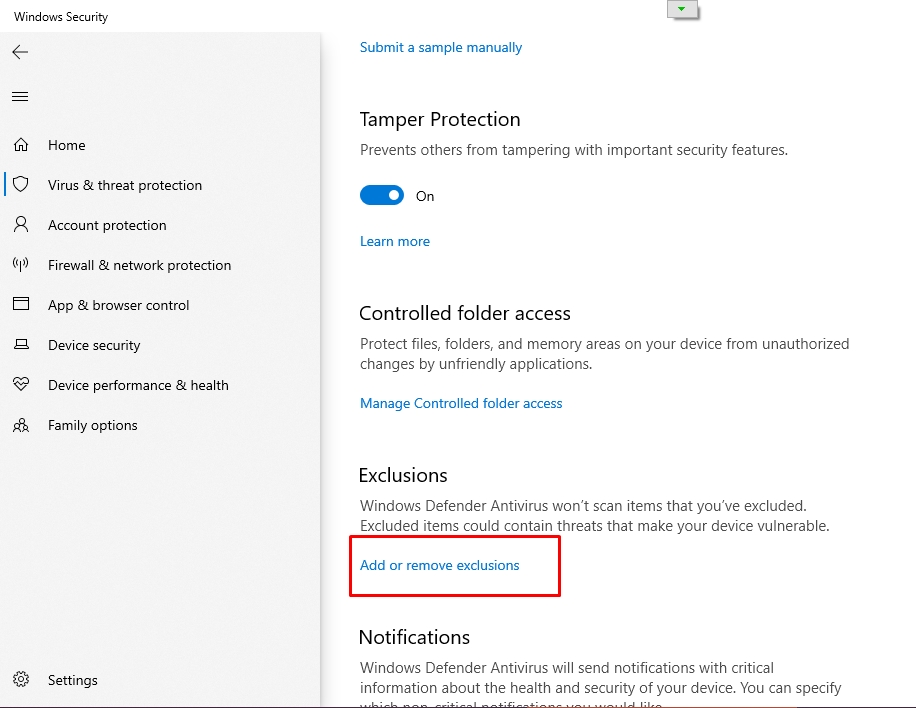
- Đặt ngoại lệ cho Windows Defenders không scan thư mục
profile- Vào
about:support, copy đường dẫn ởProfile Folder, cho vàoExclusioncủa Windows Defenders
nglayout.initialpaint.delay 2
Firefox nói riêng, và các ứng dụng Mozzila nói chung, có cơ chế render website dần dần - tức là nhận được phần nào hiển thị phần đấy. Tuy nhiên, vì phần đầu của website thường không có nhiều thông tin, Firefox sẽ chờ một khoảng thời gian delay trước khi render lần đầu tiên. Tham số nglayout.initialpaint.delay và nglayout.initialpaint.delay_in_oopif thiết lập số migi-giây Firefox chờ tải các thành phần của trang web trước khi render lần đầu tiên (Mặc địch: 250). Giá trị thấp hơn sẽ làm cho trang ban đầu hiển thị nhanh hơn nhưng sẽ khiến trang mất nhiều thời gian hơn để hoàn tất hiển thị. Giá trị cao hơn sẽ có tác dụng ngược lại.
Tăng giá trị
nglayout.initialpaint.delaysẽ cực kỳ hiệu quả khi dùng add-on như Dark Reader, chi tiết.
- Mở
about:cònig - Đặt
nglayout.initialpaint.delay=2000- Đặt
nglayout.initialpaint.delay_in_oopif=2000 - Đặt
| nglayout.initialpaint.delay | 2000 |
| nglayout.initialpaint.delay_in_oopif | 2000 |
1
2
3
// Delay to first render
user_pref("nglayout.initialpaint.delay", 2000);
user_pref("nglayout.initialpaint.delay_in_oopif", 2000);
Lưu cache trên RAM 3
- Mở
about:config - Đặt
browser.cache.disk.enable=false- Đặt
browser.cache.memory.enable=true.- Đặt
browser.cache.memory.capacity(nếu chưa có: ấn chọn kiểuNumberrồi ấn+để tạo mới) theo giá trị tương ứng (_tính theo KB - Kilobytes):- An toàn:
1048576(tương đương 1GB)
- Firefox 32bit:
524288(512MB) thôi vì ứng dụng 32bit có giới hạn số RAM (xấp xỉ 4GB) mà cứ vượt ngưỡng là sẽ treo ứng dụng (vì ở đây còn phải tính tới số RAM mà trang web đòi hỏi để render trang nữa, có những trang web siêu nặng như Youtube hay Facebook chỉ mở một tab là đi tong 1GB RAM nếu không dùng uBlock chặn quảng cáo)
- Firefox 64bit + nhà đẻ ra RAM (tầm 16GB+):
2097152-4194304(tầm 2-4GB)
- Đặt
browser.cache.memory.max_entry_size=512000(mặc định là 5120 quá ít) - Đặt
1
2
3
4
5
// Force RAM cache
user_pref("browser.cache.disk.enable", false);
user_pref("browser.cache.memory.enable", true);
user_pref("browser.cache.memory.capacity", 524288);
user_pref("browser.cache.memory.max_entry_size", 512000);
Tắt Race Cache With Network (RCWN) 4
Kể từ phiên bản 59, Firefox có một tính năng gọi là Race Cache With Network (RCWN). Nếu phát hiện ổ đĩa chậm(như HDD đời Tống - Firefox 59 release năm 2018), Firefox có thể quyết định bắt đầu yêu cầu mạng ngay lập tức mà không cần chờ bộ đệm.
- Đó là một sự đánh đổi:
- Nếu các yêu cầu mạng nhanh hơn, độ trễ sẽ được cải thiện;
- Nếu cache nhanh hơn thì băng thông mạng đã bị lãng phí.
- Vào
about:config - Đặt
network.http.rcwn.enabled=false
| network.http.rcwn.enabled | false |
1
2
// Force RAM cache - Disable RCWN
user_pref("network.http.rcwn.enabled", false);
Tắt SkeletonUI
Do cấu hình của Floorp tắt SkeletonUI đi mặc Firefox/tete/Mercury đều bật mặc định, vào config chỉnh. Cái SkeletonUI này giúp bật phát hiện luôn Firefox, nên không có lý do gì để mà tắt cả và nó hữu ích cho người già, vì họ thường nhấp liên tục vào biểu tượng trình duyệt nếu chưa thấy cửa sổ hiện lên, nhiều khi bật hàng trăm hàng nghìn Firefox lên gây tràn luôn cả RAM:
| browser.startup.preXulSkeletonUI | false |
1
2
// Disable SkeletonUI
user_pref("browser.startup.preXulSkeletonUI", false );
- Xem thêm
- https://firefox-source-docs.mozilla.org/dom/ipc/process_model.html
- https://searchfox.org/mozilla-central/source/dom/ipc/ProcessIsolation.cpp
Tắt Accessibility
Accessibility giúp các ứng dụng ngoài (Screen Reader, Antivirus, ứng dụng trợ năng..) can thiệp sâu vào Firefox để cải thiện trải nghiệm
- Mở
about:config - Đặt
accessibility.force_disabled=1
| accessibility.force_disabled | 1 |
1
2
// Disable Accessibility
user_pref("accessibility.force_disabled", 1 );
Giảm RAM (đánh đổi bằng bảo mật) (Chi tiết về cách thức hoạt động và các cấp độ của Fission)
Dưới đây là tối ưu giảm RAM, đặc biệt hiệu quả khi dùng Progressive Web Application do đặc thù chỉ dùng 1 trang web của nó.
Làm theo những cái bôi đen trong mục Tối ưu Firefox: https://voz.vn/t/tong-hop-nhung-addon-chat-cho-firefox-pc-mobile.682181/post-22174347
| dom.ipc.processCount | 1 |
| fission.autostart | false |
1
2
3
// Reduce RAM usage (lower security)
user_pref("dom.ipc.processCount", 1 );
user_pref("fission.autostart", false );
Các cấp độ Fission
- Không giới hạn số tiến trình: Chính là cài đặt mặc định
- Nội dung (bao gồm: page, iframe, …) đến từ mỗi root domain được xử lý bởi tiến trình riêng (dù là trong cùng 1 tab). VD: mở cái link sau đây sẽ thấy Firefox dùng 9 “Isolated web content process” và 1 “Isolated service worker process” cho riêng tab đó: https://voz.vn/u/haidangtueba.1457647/. Check tại
about:processeshoặcabout:support#remote-processes.- Nội dung trong nhiều tab nhưng đến từ cùng 1 root domain được dùng không quá 4 tiến trình (giá trị mặc định của dom.ipc.processCount.webIsolated).
- Giới hạn bởi số root domain:
dom.ipc.processcount.webisolated = 1 - Nội dung trong nhiều tab nhưng đến từ cùng 1 root domain được dùng 1 tiến trình. VD: mở 7 tab www.google.com, mail.google.com, docs.google.com, drive.google.com[COLOR=rgb(44, 130, 201)], cloud.google.com[COLOR=rgb(44, 130, 201)], translate.google.com[COLOR=rgb(44, 130, 201)], bard.google.com[/COLOR] [/COLOR][/COLOR] chỉ tốn 1 “Isolated web content process”.
- Giới hạn bởi số root domain:
- Giới hạn bởi content value:
fission.webContentIsolationStrategy = 2 - Chỉ những high value content mới chạy trong tiến trình riêng (không rõ Mozilla coi những trang nào là high value, chắc là các trang payment, email…), các Nội dung còn lại sẽ được xử lý bởi các “Shared web content process”, số process này chính là giá trị của dom.ipc.processCount.
- Giới hạn bởi content value:
- Không tách biệt Nội dung:
fission.webContentIsolationStrategy = 0 - Gần giống với tắt Fission vì hầu hết Nội dung đều được xử lý bởi “Shared web content processes” nhưng vẫn có các tiến trình riêng để xử lý service workers.
- Không tách biệt Nội dung:
- Tắt Fission:
fission.autostart = false - Mọi nội dung đều được xử lý bởi “Shared web content processes”.
- Tắt Fission:
Có thể thấy từ cấp độ 3 trở xuống thì dom.ipc.processCount mới có ý nghĩa.
Thói quen, sở thích duyệt web kết hợp với cấu hình máy của thím sẽ giúp thím tìm được setup phù hợp. :sexy_girl:
Tối ưu giao diện, trải nghiệm sử dụng
Mở Early Hints để tăng tốc độ tải trang5
HTTP 103 Early Hintslà phản hồi của server ngay từ lúc đang xử lý yêu cầu, bao gồm các gợi ý về các tài nguyên được cho là sẽ sử dụng. Điều này cho phép trình duyệt bắt đầutải trước tài nguyêntrước khi server xử lý xong và trả về kết quả.Xem thêm: https://developer.mozilla.org/en-US/docs/Web/HTTP/Status/103
1
2
3
4
// Enable Early hints
user_pref("network.early-hints.enabled", true);
user_pref("network.early-hints.preconnect.enabled", true);
user_pref("network.early-hints.preconnect.max_connections", 20);
Chế độ Compact (gọn gàng) có sẵn của Firefox6
| browser.compactmode.show | true |
1
2
// Compact mode (slim toolbar)
user_pref("browser.compactmode.show", true );
- Sử dụng
- Chuột phải vào thanh toolbar
- Chọn
Customize- Chọn
Compact - Chọn
- Kết quả nó sẽ gọn như này
Chế độ bỏ qua Cookie Banner7
Bỏ qua tuy nhiên nếu cần thiết Chấp nhận:
| cookiebanners.service.mode | 2 |
| cookiebanners.service.mode.privateBrowsing | 2 |
Bỏ qua hết (nếu không cho bỏ qua thì không ẩn được):
| cookiebanners.service.mode | 1 |
| cookiebanners.service.mode.privateBrowsing | 1 |
1
2
3
4
5
// Bypass Cookie Banners:
//      1 - Decline ALL (DECLINE - if FAILED, KEEP banner);
//      2 - Hide ALL    (DECLINE - if FAILED, ACCEPT - to remove banner);
user_pref("cookiebanners.service.mode", 2 );
user_pref("cookiebanners.service.mode.privateBrowsing", 2 );
Test trên Firefox 113, hoạt động cực tốt. Đỉnh nhất trong các sự lựa chọn ẩn cookie vì nó dùng 2 thuật toán chính, click như người thật (tốt hơn add-on là click máy) và nhúng cookie:
| cookiebanners.bannerClicking.enabled | true |
| cookiebanners.cookieInjector.enabled | true |
1
2
3
// Bypass Cookie Banners - emulator CLICK, cookie INJECTOR:
user_pref("cookiebanners.bannerClicking.enabled", true );
user_pref("cookiebanners.cookieInjector.enabled", true );
Smooth scroll
1
2
3
4
5
6
7
// Smooth scroll
user_pref("apz.overscroll.enabled", true);
user_pref("general.smoothScroll", true);
user_pref("mousewheel.enable_pixel_scrolling", false );
user_pref("mousewheel.default.delta_multiplier_y", 275 );
user_pref("general.smoothScroll.mouseWheel.durationMaxMS", 250 );
user_pref("general.smoothScroll.mouseWheel.durationMinMS", 200 );
Tối ưu kết nối mạng
Tắt OCSP, mở CRlite thay thế 89
OCSP (máy chủ xác thực trạng thái chứng chỉ) Firefox cứ mỗi khi các bạn kết nối với một trang web, nó sẽ gửi cái chứng chỉ đến OSCP để kiểm tra độ tin cậy của chứng chỉ, xem nó đã hết hạn hay bị giả mạo hay không thì sẽ bị buộc thu hồi.
- Nhược điểm của OCSP
- Ảnh hưởng tới tốc độ kết nối tới trang web của Firefox
- Tiết lộ thói quen sử dụng với bên thứ 3
- Không thể truy cập web nếu máy chủ OCSP lỗi
Firefox bật OCSP mặc định, Chrome đã tắt OCSP đi từ rất lâu rồi.
Tắt OSCP
- Vào
about:config - Đặt
security.OCSP.enabled=0
1
2
// Disable OSCP
user_pref("security.OCSP.enabled", 0);
Mở CrLite thay thế 9
1
2
3
// Enable CrLite
user_pref("security.remote_settings.crlite_filters.enabled", true);
user_pref("security.pki.crlite_mode", 2);
- Link:
- https://bugzilla.mozilla.org/buglist.cgi?bug_id=1429800,1670985,1753071
- https://blog.mozilla.org/security/tag/crlite/
Tối ưu DNS 10
Nếu dùng NextDNS
- Vào
about:config: - Đặt
network.trr.urilàhttps://doh3.dns.nextdns.io/- Đặt
network.trr.custom_urilàhttps://doh3.dns.nextdns.io/- Đặt
network.trr.modelà2 - Đặt
| network.trr.uri | https://doh3.dns.nextdns.io/ |
| network.trr.custom_uri | https://doh3.dns.nextdns.io/ |
| network.trr.mode | 2 |
1
2
3
4
// Next DNS
user_pref("network.trr.uri", "https://doh3.dns.nextdns.io/");
user_pref("network.trr.custom_uri", "https://doh3.dns.nextdns.io/");
user_pref("network.trr.mode", 2);
Nếu muốn dùng profile NextDNS của cá nhân, sửa thành
https://doh3.dns.nextdns.io/ID_NEXTDNS, ví dụhttps://doh3.dns.nextdns.io/abc123. Nên sử dụng profile cá nhân với thiết lậpkhông chặn quảng cáođể tăng tính ổn định cho Firefox bởi uBlock bao khoản chặn quảng cáo rồi, nếu chặn thêm bằng NextDNS thì sẽ gây lỗi web hay bị phát hiện.Nói cách khác là chỉ dùng NextDNS để lấy ECS kiếm máy chủ gần Việt Nam nhất cho Firefox - và để chặn các trang độc hại, lừa đảo.
Nếu dùng GoogleDNS:
| network.trr.disable-ECS | false |
Để ép Firefox gửi ECS cho trả về CDN gần.
| network.trr.uri | https://dns.google/dns-query |
| network.trr.custom_uri | https://dns.google/dns-query |
| network.trr.mode | 2 |
1
2
3
4
// GoogleDNS - ECS
user_pref("network.trr.uri", "https://dns.google/dns-query");
user_pref("network.trr.custom_uri", "https://dns.google/dns-query");
user_pref("network.trr.mode", 2);
Hoặc nếu bạn không muốn dùng NextDNS+GoogleDNS thì có thể thử Cloudflare Zero Trust: Hướng dẫn dùng Cloudflare Zero Trust
Bật QUICv2
- Cách thức
- https://github.com/kelmenhorst/quic-censorship/blob/main/browsers.md
- https://datatracker.ietf.org/doc/draft-duke-httpbis-quic-version-alt-svc/)
| network.http.http3.alt-svc-mapping-for-testing | doh3.dns.nextdns.io; h3=”:443”; quicv=”709a50c4,1”, dns.google; h3=”:443”; quicv=”709a50c4,1” |
1
2
// Enable QUICv2
user_pref("network.http.http3.alt-svc-mapping-for-testing", 'doh3.dns.nextdns.io; h3=":443"; quicv="709a50c4,1", dns.google; h3=":443"; quicv="709a50c4,1"');
Sự hữu ích khi dùng DNS có ECS11
Ping lần đầu vào DNS thì nó cache lại được, vì đây là ping lấy IP máy chủ, lần tiếp theo thì sẽ là 0ms
Tuy nhiên khoảng thời gian trả dữ liệu lại từ máy chủ thì thứ duy nhất làm giảm ping là máy chủ gần vị trí mình đang đặt đít, và đó là lý do tại sao ECS cần thiết nên NextDNS và GoogleDNS+ECS/Quad9 (bản https://dns11.quad9.net/dns-query) tốt hơn
Còn lý do tại sao nên dùng NextDNS đó là ECH nữa, hiện tại chỉ NextDNS và 1.1.1.1 hỗ trợ bản ghi TYPE65 giúp trình duyệt web lên được ECH, giúp vượt vũ môn vào Bonhup, Ếch Vít, Medium…
Ngoài ra NextDNS hỗ trợ chặn web độc hại/lừa đảo (giúp người thân thoát dính họa sát thân vào trang các cược cược tung cái nhà, hay bị nhà tôi ba đời lừa mua thuốc trị bách bệnh…), web mới tạo (đa phần là virus) giúp giảm tối thiểu khả năng sẽ chết vì virus vì thường nếu nó chặn tên miền mới nó chặn luôn tên miền thằng hacker nó dùng để gửi thông tin mà spyware lấy được, chặn thì nó không lấy được gì
Vậy nên nếu không dùng NextDNS thì ít nhất cũng dùng GoogleDNS+ECS chứ tội gì dùng AdguardDNS. :D
Nói chung vấn đề Greencloud hay bị chập chờn chắc do đội của ông tay to @bedepver1 đang chỉnh chọt định tuyến, các bạn hỏi han tinh hình thì cứ hỏi, còn giải pháp:
- Dùng Anexia
- Dùng GoogleDNS+ECS
Sử dụng NextDNS hợp lý12
Tiện đây mình cũng chia sẻ một thói quen tốt khi dùng NextDNS, đó là: Hai tay hai súng
Nghĩa là làm sao ?
- Một tay (
profile) không chặn quảng cáo mà chỉ chặn (chú ý đánh tích đúng): - Tên miền mới (cực quan trọng)
- Mã độc
- Lừa đảo
- Bật ECS
- Mã độc
Sử dụng profile chặn quảng cáo trên router/ncpa.cpl hay native Secure DNS của Android/iOS: Vậy là cả hộ gia đình sẽ được bảo vệ bởi việc chặn quảng cáo dù họ chả biết gì về công nghệ cả, giúp tránh những trường hợp ấn linh tinh vào virus hay vào web cá độ cược bay luôn sổ đỏ hay bị nhà tôi ba đời lừa đảo
- Một tay (
profile) chặn quảng cáo (dùng càng ít list càng tốt sẽ giảm nguy cơ bị phát hiện chặn quảng cáo): - Tất cả những cái bên trên
- List ABPVN
- List mobile để xử lý quảng cáo trong ứng dụng Android/iOS
- List ABPVN
Sử dụng profile không chặn quảng cáo trong trình duyệt web: giống bài này vì thứ tư ưu tiên trình duyệt web luôn dùng DNS mình đặt trong trình duyệt và dùng kèm add-on chặn quảng cáo như uBlock/Adguard
Như vậy trải nghiệm sẽ là tốt nhất, vì trình duyệt web sợ anti-adblock, cơ mà dùng kiểu này anti-adblock bị uBlock chém rồi nên NextDNS chỉ phải lo đảm bảo an toàn không gian mạng cho mình.
Tool để kiểm tra traceroute hiển thị cả quốc gia13
Dùng tool chuyên dụng chạy tracert, nếu thấy toàn Việt Nam là ngon: https://www.nirsoft.net/utils/country_traceroute.html
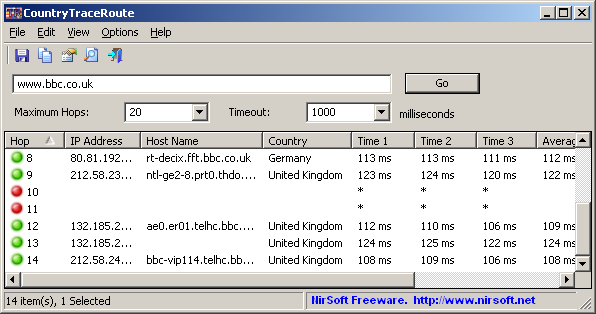
Cái hay của tool này là nó hiện quốc gia luôn, biết ngay mình bị cho du lịch sang đâu.
Bảo vệ riêng tư, bảo mật
Kháng Tracking + Canvas Fingerprint + Font Fingerprint với RFP + FluxFont 14
Lưu ý nhỏ: Riêng tư và bảo mật luôn đi kèm sự thay đổi hoặc bất tiện, cân nhắc kỹ trước khi làm theo.
- Chi tiết những thay đổi khi dùng RFP: https://librewolf.net/docs/faq/#what-are-the-most-common-downsides-of-rfp-resist-fingerprinting
- Trích lược:
- Các vấn đề trong quá trình sử dụng có thể gặp:
- Ảnh hiển thị bị sọc
- Sai múi giờ
- Light theme
- Kích thước cửa sổ nhỏ hơn và cố định khi khởi động.
- Chặn các sự kiện sửa đổi bàn phím bằng phím Alt.
- Vào
about:config - Đặt
privacy.resistFingerprinting=true
1
2
// Resist Fingerprint (RFP)
user_pref("privacy.resistFingerprinting", true);
Bật punycode để miễn nhiễm với tên miền giả mạo
Bảo mật và riêng tư luôn đi liền với bất tiện, nhìn chung nên xác định điều này và Firefox mặc định nó đủ bảo mật và riêng tư rồi, chỉ cái:
| network.IDN_show_punycode | true |
Là ai cũng nên bật vì nó sẽ phá mấy trang web dùng unicode thành dạng xn--abcxyz giúp mấy trang lừa đảo giả tên miền kiểu google.com không còn linh nữa.
Ví dụ フラワーナイトガール.攻略wiki.com khi bật punycode sẽ bị buộc thành xn--eckq7fg8cygsa1a1je.xn--wiki-4i9hs14f.com
Hoặc ngoạn mục là GOOGᒪE.com được sửa thành xn--googe-bkz.com, 𝐠𝐨𝐨𝐠ʟ𝐞.𝐜𝐨𝐦 thành xn--googe-hxc.com
Đó là sự đáng sợ của tên miền giả mạo, và tụi hacker tụi nó không nhân từ như mình mà nó y hệt google.com luôn.
1
2
// Enable punnycode
user_pref("network.IDN_show_punycode", true);
Tắt sạch tác vụ chạy nền bằng code của ArkenFox 15
Link: https://github.com/arkenfox/user.js/blob/master/user.js
- Vào link chính chủ ở trên https://github.com/arkenfox/user.js/blob/master/user.js
- copy mục
0330tới mục0405
Chú ý không copy toàn bộ vì cái Arkenfox này khiến Firefox khó dùng gấp trăm lần .
1
2
3
4
5
6
7
8
9
10
11
12
13
14
15
16
17
18
19
20
21
22
23
24
25
26
27
28
29
30
31
32
33
34
35
36
37
38
39
40
41
42
43
44
45
46
47
48
49
50
51
52
53
54
55
56
57
58
59
60
61
62
63
64
65
66
67
68
69
70
71
72
73
74
75
76
77
78
79
80
81
82
83
84
85
86
87
88
89
90
91
92
93
94
95
96
97
98
99
100
101
102
103
104
105
106
107
108
109
110
111
112
113
114
115
116
117
118
119
120
121
122
123
124
125
126
127
128
129
130
// Enable Multi-Account Container
user_pref("privacy.userContext.enabled", true); //enable Multi-Account Container
user_pref("privacy.userContext.ui.enabled", true); //enable Multi-Account Container

/*** [SECTION 0200]: GEOLOCATION / LANGUAGE / LOCALE ***/
user_pref("_user.js.parrot", "0200 syntax error: the parrot's definitely deceased!");
/* 0201: use Mozilla geolocation service instead of Google if permission is granted [FF74+]
 * Optionally enable logging to the console (defaults to false) ***/
user_pref("geo.provider.network.url", "https://location.services.mozilla.com/v1/geolocate?key=%MOZILLA_API_KEY%");
   // user_pref("geo.provider.network.logging.enabled", true); // [HIDDEN PREF]
/* 0202: disable using the OS's geolocation service ***/
user_pref("geo.provider.ms-windows-location", false); // [WINDOWS]
user_pref("geo.provider.use_corelocation", false); // [MAC]
user_pref("geo.provider.use_gpsd", false); // [LINUX]
user_pref("geo.provider.use_geoclue", false); // [FF102+] [LINUX]

/*** [SECTION 0300]: QUIETER FOX ***/
user_pref("_user.js.parrot", "0300 syntax error: the parrot's not pinin' for the fjords!");
/** RECOMMENDATIONS ***/
/* 0320: disable recommendation pane in about:addons (uses Google Analytics) ***/
user_pref("extensions.getAddons.showPane", false); // [HIDDEN PREF]
/* 0321: disable recommendations in about:addons' Extensions and Themes panes [FF68+] ***/
user_pref("extensions.htmlaboutaddons.recommendations.enabled", false);
/* 0322: disable personalized Extension Recommendations in about:addons and AMO [FF65+]
 * [NOTE] This pref has no effect when Health Reports (0331) are disabled
 * [SETTING] Privacy & Security>Firefox Data Collection & Use>Allow Firefox to make personalized extension recommendations
 * [1] https://support.mozilla.org/kb/personalized-extension-recommendations ***/
user_pref("browser.discovery.enabled", false);

/** TELEMETRY ***/
/* 0330: disable new data submission [FF41+]
 * If disabled, no policy is shown or upload takes place, ever
 * [1] https://bugzilla.mozilla.org/1195552 ***/
user_pref("datareporting.policy.dataSubmissionEnabled", false);
/* 0331: disable Health Reports
 * [SETTING] Privacy & Security>Firefox Data Collection & Use>Allow Firefox to send technical... data ***/
user_pref("datareporting.healthreport.uploadEnabled", false);
/* 0332: disable telemetry
 * The "unified" pref affects the behavior of the "enabled" pref
 * - If "unified" is false then "enabled" controls the telemetry module
 * - If "unified" is true then "enabled" only controls whether to record extended data
 * [NOTE] "toolkit.telemetry.enabled" is now LOCKED to reflect prerelease (true) or release builds (false) [2]
 * [1] https://firefox-source-docs.mozilla.org/toolkit/components/telemetry/telemetry/internals/preferences.html
 * [2] https://medium.com/georg-fritzsche/data-preference-changes-in-firefox-58-2d5df9c428b5 ***/
user_pref("toolkit.telemetry.unified", false);
user_pref("toolkit.telemetry.enabled", false); // see [NOTE]
user_pref("toolkit.telemetry.server", "data:,");
user_pref("toolkit.telemetry.archive.enabled", false);
user_pref("toolkit.telemetry.newProfilePing.enabled", false); // [FF55+]
user_pref("toolkit.telemetry.shutdownPingSender.enabled", false); // [FF55+]
user_pref("toolkit.telemetry.updatePing.enabled", false); // [FF56+]
user_pref("toolkit.telemetry.bhrPing.enabled", false); // [FF57+] Background Hang Reporter
user_pref("toolkit.telemetry.firstShutdownPing.enabled", false); // [FF57+]
/* 0333: disable Telemetry Coverage
 * [1] https://blog.mozilla.org/data/2018/08/20/effectively-measuring-search-in-firefox/ ***/
user_pref("toolkit.telemetry.coverage.opt-out", true); // [HIDDEN PREF]
user_pref("toolkit.coverage.opt-out", true); // [FF64+] [HIDDEN PREF]
user_pref("toolkit.coverage.endpoint.base", "");
/* 0334: disable PingCentre telemetry (used in several System Add-ons) [FF57+]
 * Defense-in-depth: currently covered by 0331 ***/
user_pref("browser.ping-centre.telemetry", false);
/* 0335: disable Firefox Home (Activity Stream) telemetry ***/
user_pref("browser.newtabpage.activity-stream.feeds.telemetry", false);
user_pref("browser.newtabpage.activity-stream.telemetry", false);

/** STUDIES ***/
/* 0340: disable Studies
 * [SETTING] Privacy & Security>Firefox Data Collection & Use>Allow Firefox to install and run studies ***/
user_pref("app.shield.optoutstudies.enabled", false);
/* 0341: disable Normandy/Shield [FF60+]
 * Shield is a telemetry system that can push and test "recipes"
 * [1] https://mozilla.github.io/normandy/ ***/
user_pref("app.normandy.enabled", false);
user_pref("app.normandy.api_url", "");

/** CRASH REPORTS ***/
/* 0350: disable Crash Reports ***/
user_pref("breakpad.reportURL", "");
user_pref("browser.tabs.crashReporting.sendReport", false); // [FF44+]
   // user_pref("browser.crashReports.unsubmittedCheck.enabled", false); // [FF51+] [DEFAULT: false]
/* 0351: enforce no submission of backlogged Crash Reports [FF58+]
 * [SETTING] Privacy & Security>Firefox Data Collection & Use>Allow Firefox to send backlogged crash reports  ***/
user_pref("browser.crashReports.unsubmittedCheck.autoSubmit2", false); // [DEFAULT: false]

/** OTHER ***/
/* 0360: disable Captive Portal detection
 * [1] https://www.eff.org/deeplinks/2017/08/how-captive-portals-interfere-wireless-security-and-privacy ***/
user_pref("captivedetect.canonicalURL", "");
user_pref("network.captive-portal-service.enabled", false); // [FF52+]
/* 0361: disable Network Connectivity checks [FF65+]
 * [1] https://bugzilla.mozilla.org/1460537 ***/
user_pref("network.connectivity-service.enabled", false);

/*** [SECTION 0400]: SAFE BROWSING (SB)
   SB has taken many steps to preserve privacy. If required, a full url is never sent
   to Google, only a part-hash of the prefix, hidden with noise of other real part-hashes.
   Firefox takes measures such as stripping out identifying parameters and since SBv4 (FF57+)
   doesn't even use cookies. (#Turn on browser.safebrowsing.debug to monitor this activity)

   [1] https://feeding.cloud.geek.nz/posts/how-safe-browsing-works-in-firefox/
   [2] https://wiki.mozilla.org/Security/Safe_Browsing
   [3] https://support.mozilla.org/kb/how-does-phishing-and-malware-protection-work
   [4] https://educatedguesswork.org/posts/safe-browsing-privacy/
***/
user_pref("_user.js.parrot", "0400 syntax error: the parrot's passed on!");
/* 0401: disable SB (Safe Browsing)
 * [WARNING] Do this at your own risk! These are the master switches
 * [SETTING] Privacy & Security>Security>... Block dangerous and deceptive content ***/
   // user_pref("browser.safebrowsing.malware.enabled", false);
   // user_pref("browser.safebrowsing.phishing.enabled", false);
/* 0402: disable SB checks for downloads (both local lookups + remote)
 * This is the master switch for the safebrowsing.downloads* prefs (0403, 0404)
 * [SETTING] Privacy & Security>Security>... "Block dangerous downloads" ***/
   // user_pref("browser.safebrowsing.downloads.enabled", false);
/* 0403: disable SB checks for downloads (remote)
 * To verify the safety of certain executable files, Firefox may submit some information about the
 * file, including the name, origin, size and a cryptographic hash of the contents, to the Google
 * Safe Browsing service which helps Firefox determine whether or not the file should be blocked
 * [SETUP-SECURITY] If you do not understand this, or you want this protection, then override this ***/
user_pref("browser.safebrowsing.downloads.remote.enabled", false);
   // user_pref("browser.safebrowsing.downloads.remote.url", ""); // Defense-in-depth
/* 0404: disable SB checks for unwanted software
 * [SETTING] Privacy & Security>Security>... "Warn you about unwanted and uncommon software" ***/
   // user_pref("browser.safebrowsing.downloads.remote.block_potentially_unwanted", false);
   // user_pref("browser.safebrowsing.downloads.remote.block_uncommon", false);
/* 0405: disable "ignore this warning" on SB warnings [FF45+]
 * If clicked, it bypasses the block for that session. This is a means for admins to enforce SB
 * [TEST] see https://github.com/arkenfox/user.js/wiki/Appendix-A-Test-Sites#-mozilla
 * [1] https://bugzilla.mozilla.org/1226490 ***/
   // user_pref("browser.safebrowsing.allowOverride", false);
Nguồn:
https://voz.vn/t/tong-hop-nhung-addon-chat-cho-firefox-pc-mobile.682181/page-280#post-27527209 ↩︎
https://voz.vn/t/tong-hop-nhung-addon-chat-cho-firefox-pc-mobile.682181/page-38#post-23570551 ↩︎ ↩︎2
https://voz.vn/t/cach-ep-firefox-luu-cache-tren-ram-ma-khong-can-ramdisk.664955/ ↩︎
https://voz.vn/t/tong-hop-nhung-addon-chat-cho-firefox-pc-mobile.682181/page-262#post-27409530 ↩︎
https://voz.vn/t/tong-hop-nhung-addon-chat-cho-firefox-pc-mobile.682181/page-188#post-25845776 ↩︎
https://voz.vn/t/tong-hop-nhung-addon-chat-cho-firefox-pc-mobile.682181/page-157#post-25530119 ↩︎
https://voz.vn/t/tong-hop-nhung-addon-chat-cho-firefox-pc-mobile.682181/page-69#post-24344300 ↩︎
https://voz.vn/t/tong-hop-nhung-addon-chat-cho-firefox-pc-mobile.682181/post-24344471 ↩︎ ↩︎2
https://voz.vn/t/tong-hop-nhung-addon-chat-cho-firefox-pc-mobile.682181/page-85#post-24688026 ↩︎
https://voz.vn/t/tat-tan-tat-ve-dich-vu-nextdns.522718/post-25454142 ↩︎
https://voz.vn/t/tat-tan-tat-ve-dich-vu-nextdns.522718/post-27558297 ↩︎
https://voz.vn/t/tat-tan-tat-ve-dich-vu-nextdns.522718/post-25489531 ↩︎
https://voz.vn/t/tong-hop-nhung-addon-chat-cho-firefox-pc-mobile.682181/page-97#post-24757875 ↩︎
https://voz.vn/t/tong-hop-nhung-addon-chat-cho-firefox-pc-mobile.682181/page-17#post-22955672 ↩︎