[Firefox Awesome] Các userChromeJS/CSS hay ho
userChrome.JS1
Giải thích ngắn gọn: Inject code JavaScript, chạy trên ngữ cảnh của Firefox browser. Tức là can thiệp trực tiếp vào code logic của Firefox. Để so sánh thì các script chạy trên *monkey chỉ hoạt động trên ngữ cảnh của trang web, không tác động được vào browser. Các Addon thì chỉ sử dụng những API mà Firefox expose ra, nên tác động hạn chế.
Về cơ bản các userChromeJS script sẽ không có hạn chế gì cả. Tác động được vào tất cả các phần viết bằng JavaScript của Firefox (còn các phần khác viết bằng C++ hay các ngôn ngữ khác thì không được).
Ngoài ra các script này còn có toàn quyền đọc/ghi trên ổ cứng của bạn. Cực kỳ nguy hiểm. Phải kiểm tra rất cẩn thận trước khi sử dụng.
Cài fx-autoconfig (userChrome.js manager)
- Tải về, giải nén (hoặc
git clone) - Chú ý 2 thư mục
profilevàprogram
1
2
3
4
5
6
7
8
9
10
11
.
├── profile
│   └── chrome
│       ├── CSS
│       ├── JS
│       ├── resources
│       └── utils
└── program
    ├── config.js
    └── defaults
        └── pref
- Copy nội dung bên trong thư mục
program(gồm fileconfig.jsvà cả thư mụcdefaults) vào thư mục cài đặt Firefox - Windows
Thường là
C:\Program Files\Mozilla Firefox\: cảconfig.jsvà thư mụcdefaultssẽ nằm cạnhfirefox.exe- MacOS
Thường là
/Applications/Firefox.app/Contents/MacOS/hoặc/Applications/Firefox Nightly.app/Contents/MacOS/- Linux
Thường là
/usr/lib/firefox/hoặc/usr/lib64/firefox/:config.jsnằm cùng thư mục với tập nhị phânfirefox - Copy nội dung bên trong thư mục
profile(gồm cả thư mụcchrome) vào thư mục profile đang dùng của Firefox - Merge nếu đã có thư mục
chrome
Để tìm thư mục cài đặt và profile của Firefox nhanh
Mở
about:support
- Thư mục cài đặt nằm ở dòng
Application Binary- Thư mục profile nằm ở dòng
Profile Folder(Có nútOpen Profile Foldertrên Windows,Show in Findertrên MacOS để mở nhanh)
Bộ loader
fx-autoconfigcủa @MrOtherGuy sẽ tự động load các file*.uc.js,*.uc.mjs,*.sys.mjs(trong thư mụcchrome/JS/) và các file*.uc.css(trong thư mụcchrome/CSS/). Chú ý đổi tên file để load được script. (Không hiểu sao riêng FLoorP thì lại tự động load hết, không cần đổi tên - hên xui!)
- Có repo userChromeJS đáng chú ý:
firefox-scriptscủa @xiaoxiaoflood- Link: https://github.com/xiaoxiaoflood/firefox-scripts
fx-autoconfigcủa @MrOtherGuy- Link: https://github.com/MrOtherGuy/fx-autoconfig
- Cũng là tác giả của nhiều tweak css tại https://github.com/MrOtherGuy/firefox-csshacks
userChrome.jscủa @alice0775, người Nhật nên đọc comment code cũng vất vả xíu.- Link: https://github.com/alice0775/userChrome.js
uc.css.jscủa @aminomancer.- Link: https://github.com/aminomancer/uc.css.js
Script viết theo loader của MrOtherGuy, alice0775 và aminimancer khá tương thích với nhau, còn bộ loader số 1 của @xiaoxiaoflood cần viết theo cấu trúc khác hẳn. Nhưng nói chung nếu bỏ công sức ra thì cũng port qua lại được.
Sau khi cài UserChrome JS/CSS mới, restart lại Firefox: :
about:support->Clear startup cache...(xóa cache cũ)
Extension Option Panel (nút quản lý addon)2 (Tác giả @aminomancer)
- Link: https://github.com/aminomancer/uc.css.js/#extension-options-panel
- Copy vào thư mục
PROFILE_DIR/chrome/JS/
about:userchrome - giao diện quản lý userChrome.JS (Tác giả @aminomancer)
- Tải cả repo kia về
- Cách 1:
Code=>Download ZIP, giải nén, mở ra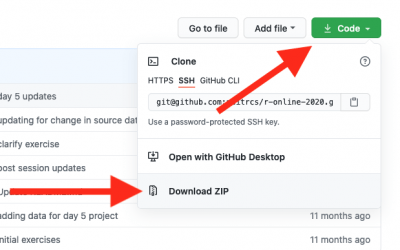
- Cách 2:
git clone https://github.com/aminomancer/uc.css.js/ - Cấu trúc thư mục
uc.css.js - Chú ý 2 thư mục con
CSS,JS,resources,utils- (cấu trúc tương tự fx-autoconfig bên trên )
1
2
3
4
5
6
.
├── CSS
├── JS
├── resource
├── utils
...
- Mở thư mục
uc.css.js/JS - Tìm và copy file
aboutUserChrome.sys.mjsvào thư mụcPROFILE_DIR/chrome/JScủa Firefox - Mở thư mục
uc.css.js/resources/aboutuserchrome - Tìm và copy thư mục
aboutuserchromevào thư mụcPROFILE_DIR/chrome/resourcescủa Firefox - Cấu trúc thư mục
PROFILE_DIR\chrome\mới - Các file/folder đã có vẫn giữ nguyên
1
2
3
4
5
6
7
8
9
10
11
12
13
14
15
16
.
├── CSS
│   └── ...
├── JS
│   └── aboutUserChrome.sys.mjs
├── resources
│   ├── aboutuserchrome
│   │   ├── aboutuserchrome.css
│   │   ├── aboutuserchrome.html
│   │   ├── aboutuserchrome.js
│   │   ├── chrome
│   │   ├── modules
│   │   └── src
|   └── ...
└── utils
    └── ...
userChrome.CSS 3
Có 02 cách chính để Bật userChrome.CSS:
Sửa trong
about:config: | toolkit.legacyUserProfileCustomizations.stylesheets | true |Sửa file
user.js(khuyến khích để có thể theo dõi thay đổi và backup):
- Mở
about:support=> Open Profile Folder- Đóng Firefox (tắt hẳn - chú ý với MacOS: Close khác với Quit)
- Tạo mới nếu chưa có
- Thêm dòng mới
user_pref("toolkit.legacyUserProfileCustomizations.stylesheets", true);- Save và mở Firefox
user.jslà file javascript nên có thể sử dụng//và/**/để viết ghi chú
Tắt CSS3 Animation 4
Trong
about:configcó tham sốui.prefersReducedMotionđể bắt trang web nó không dùng animation, tuy nhiên hỏi là một chuyện người ta đồng ý hay không lại là một chuyện khác vì nó đòi hỏi trang web phải sử dụng CSS@media (prefers-reduced-motion) {/* styles to apply if a user's device settings are set to reduced motion */}
Ngoài ra nếu sử dụng thêm Header Editor để gửi thêm header
Sec-CH-Prefers-Reduced-Motion: "reduce"thì sẽ hiệu quả hơn vì sẽ khiến trang web hiểu điều này để trả về trang web không dùng animation.
- Mở folder
PROFILE_DIR/chrome: - Tạo một file
userContent.css- Copy tất cả đoạn bên dưới vào, sau đó khởi động lại Firefox:
1
2
3
4
5
6
7
8
9
10
11
12
13
14
15
16
*, *:before, *:after {
    border-radius:unset!important;
    box-shadow:unset!important;
    text-shadow:unset!important;
    text-transform:unset!important;
    animation-iteration-count:1!important;
    scroll-behavior:unset!important;
    moz-animation-iteration-count:1!important;
    webkit-animation-iteration-count:1!important;
    backdrop-filter:unset!important;
    filter:unset!important;
    animation-timing-function: step-start !important;
    transition-timing-function: step-start !important;
    filter:none!important;
    text-rendering:none!important;
}
Test thử ở trang này, nếu cục CSS màu xanh lá không chạy animation là thành công: https://www.w3schools.com/css/css3_animations.asp
Thanh tìm kiếm Findbar phía bên trên trình duyệt (giống Chrome)
- Link: https://github.com/MrOtherGuy/firefox-csshacks/blob/master/chrome/floating_findbar_on_top.css
- Copy vào thư mục
PROFILE_DIR/chrome/CSS/
- Nếu muốn để thanh Findbar nằm góc trên bên phải
about:config=> tạo key mới:Tên:
userchrome.floating-findbar-on-right.enabledKiểu:
BooleanGiá trị:
true
| userchrome.floating-findbar-on-right.enabled | true |
1
2
// UserChrome.CSS Findbar floating on Top-Right (as Google Chrome)
user_pref("userchrome.floating-findbar-on-right.enabled", true);
Tùy biến menu quản lý add-on mặc định của Firefox (biểu tượng miếng xếp hình)
Ẩn/ Đổi màu icon
Khi sử dụng userChrome.JS Extension Option Panel ở trên, trên thanh toolbar sẽ có 2 biểu tượng quản lý add-on: 1 của Firefox, 1 của script. Có thể ẩn hoặc đổi màu cái biểu tượng mặc định cho đỡ nhầm. Nhưng mà vì cái manifest V3 nên cái quản lý addon mặc định dùng để mở menu và pin add-on lên toolbar, nên hay nhất là đổi màu cho cái biểu tượng đấy
- Tắt hẳn Firefox
- Mở thư mục
PROFILE_DIR/chrome/CSS/:- Tạo file
custom_puzzle_addon_icon.uc.css- Copy đoạn CSS ở dưới vào, muốn ẩn/đổi màu thì xóa (hoặc đặt comment /* */) cái còn lại
- Lưu lại, khởi động lại Firefox
- Tạo file
1
2
3
4
5
6
7
8
9
10
11
12
13
14
15
16
17
/*
** REMOVE
*/

/*#unified-extensions-button,
#unified-extensions-button > .toolbarbutton-icon{
	width: 0px !important;
	padding: 0px !important;
}*/

/*
** CHANGE COLOR
*/
#unified-extensions-button {
    color: red!important;
	fill: red !important;
}
Thu nhỏ danh sách add-on
- Tắt hẳn Firefox
- Mở thư mục
PROFILE_DIR/chrome/CSS/:- Tải thẳng file
cleaner_extensions_menu.cssđã tải ở Link trên vào đây- Đổi tên
cleaner_extensions_menu**.uc**.css- Lưu lại, khởi động lại Firefox
- Tải thẳng file
- Kết quả
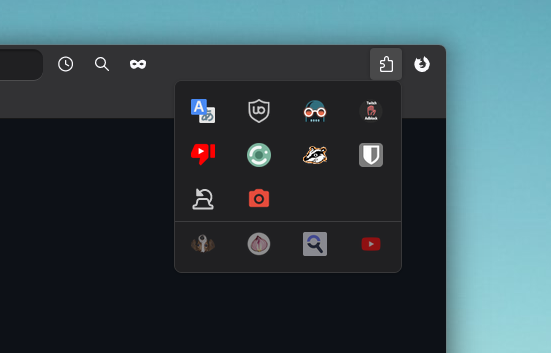
- Nếu không thích cái gạch chia menu thì mở thư mục
No Seperate Linetải filecleaner_extension_menu.cssvề là làm tương tự

Đổi màu Tab đang phát âm thanh
- Tắt hẳn Firefox
- Mở thư mục
PROFILE_DIR/chrome/CSS/:- Tải thẳng file
colored_soundplaying_tab.cssđã tải ở Link trên vào đây- Đổi tên
colored_soundplaying_tab**.uc**.css- Lưu lại, khởi động lại Firefox
- Tải thẳng file
- Kết quả

Nguồn:
https://voz.vn/t/tong-hop-nhung-addon-chat-cho-firefox-pc-mobile.682181/page-172#post-25670849 ↩︎
https://voz.vn/t/tong-hop-nhung-addon-chat-cho-firefox-pc-mobile.682181/post-27662606 ↩︎
https://voz.vn/t/tong-hop-nhung-addon-chat-cho-firefox-pc-mobile.682181/page-160#post-25566309 ↩︎
https://voz.vn/t/tong-hop-nhung-addon-chat-cho-firefox-pc-mobile.682181/page-160#post-25566309 ↩︎