Debian là gì
Debian là một distro linux
Phần cứng
1
2
3
4
5
6
7
8
9
10
11
12
13
14
15
16
17
18
19
20
21
22
23
24
25
26
27
| λ › fastfetch ~
_,met$$$$$gg. ducminh3112@debiplex
,g$$$$$$$$$$$$$$$P. --------------------
,g$$P"" """Y$$.". OS: Debian GNU/Linux 12 (bookworm) x86_64
,$$P' `$$$. Host: OptiPlex 5080
',$$P ,ggs. `$$b: Kernel: Linux 6.1.0-37-amd64
`d$$' ,$P"' . $$$ Uptime: 15 mins
$$P d$' , $$P Packages: 2728 (dpkg), 12 (flatpak)
$$: $$. - ,d$$' Shell: zsh 5.9
$$; Y$b._ _,d$P' Display (DELL E2214H): 1080x1920 @ 60 Hz in 22" [External]
Y$$. `.`"Y$$$$P"' Display (DELL U2720Q): 3840x2160 @ 60 Hz (as 2194x1234) in 27" [External] *
`$$b "-.__ DE: KDE Plasma 5.27.5
`Y$$b WM: KWin (Wayland)
`Y$$. WM Theme: Breeze
`$$b. Theme: Breeze (Light) [Qt], Breeze [GTK2/3]
`Y$$b. Icons: breeze [Qt], breeze [GTK2/3/4]
`"Y$b._ Font: Noto Sans (10pt) [Qt], Noto Sans (10pt) [GTK2/3/4]
`"""" Cursor: breeze (24px)
Terminal: konsole 22.12.3
CPU: Intel(R) Core(TM) i7-10700 (16) @ 4.80 GHz
GPU: Intel UHD Graphics 630 @ 1.20 GHz [Integrated]
Memory: 6.28 GiB / 15.33 GiB (41%)
Swap: 0 B / 977.00 MiB (0%)
Disk (/): 18.91 GiB / 232.24 GiB (8%) - ext4
Disk (/media/ducminh3112/Internal): 19.35 GiB / 223.58 GiB (9%) - fuseblk
Local IP (eno1): 10.0.5.9/24
Locale: en_US.UTF-8
|
Cài Debian 12 “Bookworm”
Desktop Environment thì chọn XFCE cho nhẹ, hoặc KDE cho nhiều tính năng. Máy cùi Celeron thì chọn XFCE thôi
Nên cài = file ISO netinstall, chứ cài bằng file full lại phải vào /etc/apt/sources.list tắt cái source DVD đi. Không tắt thì apt update nó lại báo lỗi thiếu source, lằng nhằng lắm
Cài Debian 12 đến bước chọn Desktop Environment có thể chọn luônXFCE, ssh server và standard system utilities cho nhanh
Chạy với quyền su
Mấy thứ khác
Thêm user vào sudo
1
2
| su -
usermod -aG sudo <username>
|
Flatpak + Flathub
1
2
3
4
5
6
7
8
9
10
| # Install Flatpak
sudo apt install flatpak
# Install the Software Flatpak plugin
sudo apt install plasma-discover-backend-flatpak
# Add the Flathub repository
flatpak remote-add --if-not-exists flathub https://dl.flathub.org/repo/flathub.flatpakrepo
# Restart
|
Trình duyệt Zen Browser
1
2
3
4
5
| # Manual Install
flatpak install flathub app.zen_browser.zen
# Run
flatpak run app.zen_browser.zen
|
Docker
1
2
3
4
5
6
7
8
9
10
11
12
13
14
15
16
17
18
19
| # Add Docker's official GPG key:
sudo apt-get update
sudo apt-get install ca-certificates curl
sudo install -m 0755 -d /etc/apt/keyrings
sudo curl -fsSL https://download.docker.com/linux/debian/gpg -o /etc/apt/keyrings/docker.asc
sudo chmod a+r /etc/apt/keyrings/docker.asc
# Add the repository to Apt sources:
echo \
"deb [arch=$(dpkg --print-architecture) signed-by=/etc/apt/keyrings/docker.asc] https://download.docker.com/linux/debian \
$(. /etc/os-release && echo "$VERSION_CODENAME") stable" | \
sudo tee /etc/apt/sources.list.d/docker.list > /dev/null
sudo apt-get update
# Install the latest Docker packages.
sudo apt-get install docker-ce docker-ce-cli containerd.io docker-buildx-plugin docker-compose-plugin
# Verify
sudo docker run hello-world
|
WakeMeOps + lazydocker
1
2
3
4
5
| # Add WakeMeOps repository
curl -sSL https://raw.githubusercontent.com/upciti/wakemeops/main/assets/install_repository | sudo bash
# Install lazydocker
sudo apt install lazydocker
|
zsh + zimfw
1
2
3
4
5
6
7
8
9
10
11
12
13
| # Install
sudo apt install zsh
# Make zsh default
chsh -s /bin/zsh
# Installing Zim
curl -fsSL https://raw.githubusercontent.com/zimfw/install/master/install.zsh | zsh
# zsh theme
sudo nano ~/.zimrc
# Add 'zmodule <theme>' to ~/.zimrc
zimfw install
|
LocalSend
1
2
3
4
5
| # Install
flatpak install flathub org.localsend.localsend_app
# Run
flatpak run org.localsend.localsend_app
|
Vim/Neovim + VimPlug
Awesome Neovim: https://github.com/rockerBOO/awesome-neovim
1
2
3
4
5
6
7
8
9
10
| # Install neovim
sudo apt install neovim
# Install vimplug on vim
curl -fLo ~/.vim/autoload/plug.vim --create-dirs \
https://raw.githubusercontent.com/junegunn/vim-plug/master/plug.vim
# Install vimplug on neovim
sh -c 'curl -fLo "${XDG_DATA_HOME:-$HOME/.local/share}"/nvim/site/autoload/plug.vim --create-dirs \
https://raw.githubusercontent.com/junegunn/vim-plug/master/plug.vim'
|
1
2
3
4
5
6
7
8
9
10
11
12
13
14
15
16
17
18
19
20
21
22
23
24
25
26
27
28
29
| " The default plugin directory will be as follows:
" - Vim (Linux/macOS): '~/.vim/plugged'
" - Vim (Windows): '~/vimfiles/plugged'
" - Neovim (Linux/macOS/Windows): stdpath('data') . '/plugged'
" You can specify a custom plugin directory by passing it as the argument
" - e.g. `call plug#begin('~/.vim/plugged')`
" - Avoid using standard Vim directory names like 'plugin'
call plug#begin()
" List your plugins here
Plug 'junegunn/fzf.vim'
Plug 'preservim/nerdtree'
Plug 'vim-airline/vim-airline' "Lean & mean status/tabline for vim that's light as air.
Plug 'tyru/open-browser.vim' " opens url in browser
Plug 'tpope/vim-fugitive'
Plug 'ycm-core/YouCompleteMe', { 'do': './install.py' }
" End list
call plug#end()
" Config NERDTree
" Start NERDTree and put the cursor back in the other window.
autocmd VimEnter * NERDTree | wincmd p
" Exit Vim if NERDTree is the only window remaining in the only tab.
autocmd BufEnter * if tabpagenr('$') == 1 && winnr('$') == 1 && exists('b:NERDTree') && b:NERDTree.isTabTree() | call feedkeys(":quit\<CR>:\<BS>") | endif
" Close the tab if NERDTree is the only window remaining in it.
autocmd BufEnter * if winnr('$') == 1 && exists('b:NERDTree') && b:NERDTree.isTabTree() | call feedkeys(":quit\<CR>:\<BS>") | endif
" If another buffer tries to replace NERDTree, put it in the other window, and bring back NERDTree.
autocmd BufEnter * if winnr() == winnr('h') && bufname('#') =~ 'NERD_tree_\d\+' && bufname('%') !~ 'NERD_tree_\d\+' && winnr('$') > 1 |
\ let buf=bufnr() | buffer# | execute "normal! \<C-W>w" | execute 'buffer'.buf | endif
|
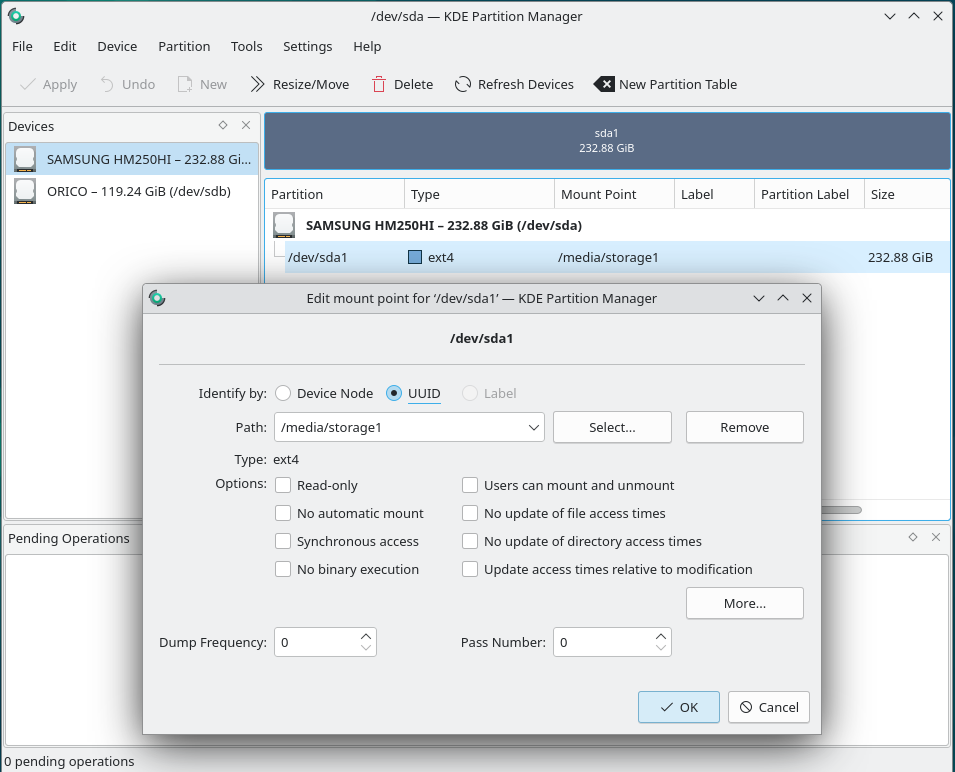
Tự động mount ổ cứng Data
KDE Partition Manager > Edit Mount Point
fastfetch
Ubuntu 20.04 or newer and Debian 11 or newer: Download from https://github.com/fastfetch-cli/fastfetch/releases/latest
1
2
| # Debian 13 or newer
sudo apt install fastfetch
|
tailscale
1
| curl -fsSL https://tailscale.com/install.sh | sh
|
Gõ tiếng Việt
Bamboo (Vietnamese Input Method) engine support for Fcitx: https://github.com/fcitx/fcitx5-bamboo
1
2
3
4
5
6
| sudo apt install fcitx5 fcitx5-bamboo --install-recommends
echo -e 'export XMODIFIERS="@im=fcitx"\nexport GTK_IM_MODULE=fcitx\nexport QT_IM_MODULE=fcitx' | tee ~/.xprofile ~/.bash_profile > /dev/null
im-config -n fcitx5
echo -e '[Desktop Entry]\nType=Application\nExec=fcitx5 -d\nHidden=false\nNoDisplay=false\nX-GNOME-Autostart-enabled=true\nName[en_US]=Fcitx 5\nName=Fcitx 5\nComment[en_US]=Input method\nComment=Input method\n' | tee ~/.config/autostart/fcitx5.desktop > /dev/null
fcitx5-configtool # add Bamboo input method
fcitx5 -dr
|
AdguardVPN
1
2
3
4
5
6
7
8
9
10
11
12
13
14
15
16
17
| # Install
curl -fsSL https://raw.githubusercontent.com/AdguardTeam/AdGuardVPNCLI/master/scripts/release/install.sh | sh -s -- -v
# Login
adguardvpn-cli login
# Available locations
adguardvpn-cli list-locations
# Connect to a specific location (city, country, or ISO code)
adguardvpn-cli connect -l LOCATION_NAME
# Quick connect
adguardvpn-cli connect
# Help
adguardvpn-cli --help-all
|
Nguồn/Tham khảo:
 KDE Partition Manager > Edit Mount Point